

Eagle library hard to search? Build and test rules with AI
Este contenido aún no ha sido traducido al Español. Te mostraremos la versión en inglés a continuación.
Work with an AI agent to make your Eagle library easier to search
You remember saving the blue packaging reference. You can picture the front panel, but searching for “blue packaging” returns other cartons, and the project folder you expected to find it in is empty. Before changing your folder structure, find out why the search missed it.
An AI agent can help you turn a few real work needs into search tests, identify missing clues, and develop rules to try in Eagle. You explain your work and judge the assets; the agent helps compare possible causes and turn your decisions into instructions you can use again. Start with a small part of your existing library, then check the search results and the effort needed to maintain your library under those rules.
You can work through this in an ordinary AI conversation and apply the changes yourself. An agent needs a working Eagle connection to make changes directly. The examples below illustrate the process; use your own materials and record what actually happens.
Plan library search tests with your AI agent
Give the agent enough context to propose tests that resemble your work. “Organize my library” leaves it to guess which assets matter, how you look for them, and what would count as a useful result.
Describe your work with examples
Answer the prompts below with brief, concrete examples from your work.
| What to tell the agent | What to include | Example answer |
|---|---|---|
| Work and clients | Recurring assignments and relevant differences between them | “I develop packaging directions for food brands and make short launch videos.” |
| Design process | When you look for saved material and what you do with it | “I compare typography references during concept development; later I look for footage to place in an edit.” |
| Assets and uses | Asset formats and whether you keep them for study or possible use in a deliverable | “Carton images are references. Some city clips are candidates for paid client videos.” |
| Remembered clues and requirements | Words, appearance, projects, and requirements an asset must meet | “I remember blue cartons with text in a narrow column and plenty of space around it. Footage needs to suit a portrait frame and have documented terms for the intended use.” |
| Existing organization | Actual folder names, tags, and a typical saved note | “Projects hold the collected references. Tags include blue, simple, minimal, and typography; notes are uneven.” |
| A recent failure | What you wanted, where you searched, and what went wrong | “I searched blue packaging inside one old project, but I may have saved the image during research for another.” |
The agent might ask, “Does blue need to cover the package, or can it be a small accent?” or “Do you need that exact reference, or any example of the same typography relationship?” Your answers determine which results should count.
Agree on what a successful search would return
Choose needs that reveal different problems in your library. For each one, define what a suitable result would look like and how you would judge it:
| Work need | Suitable result | Evidence you need to inspect |
|---|---|---|
| Recover the blue carton reference used in a previous concept | The particular image you recognize, with the relevant project relationship | The image, plus your project record or recollection of using it; color alone does not establish past use |
| Find portrait city B-roll (supporting footage) for a paid client edit | Footage with the required scene and usable framing, with source terms checked for this intended use | The actual clip and its source records; a “commercial” tag is not enough to settle suitability |
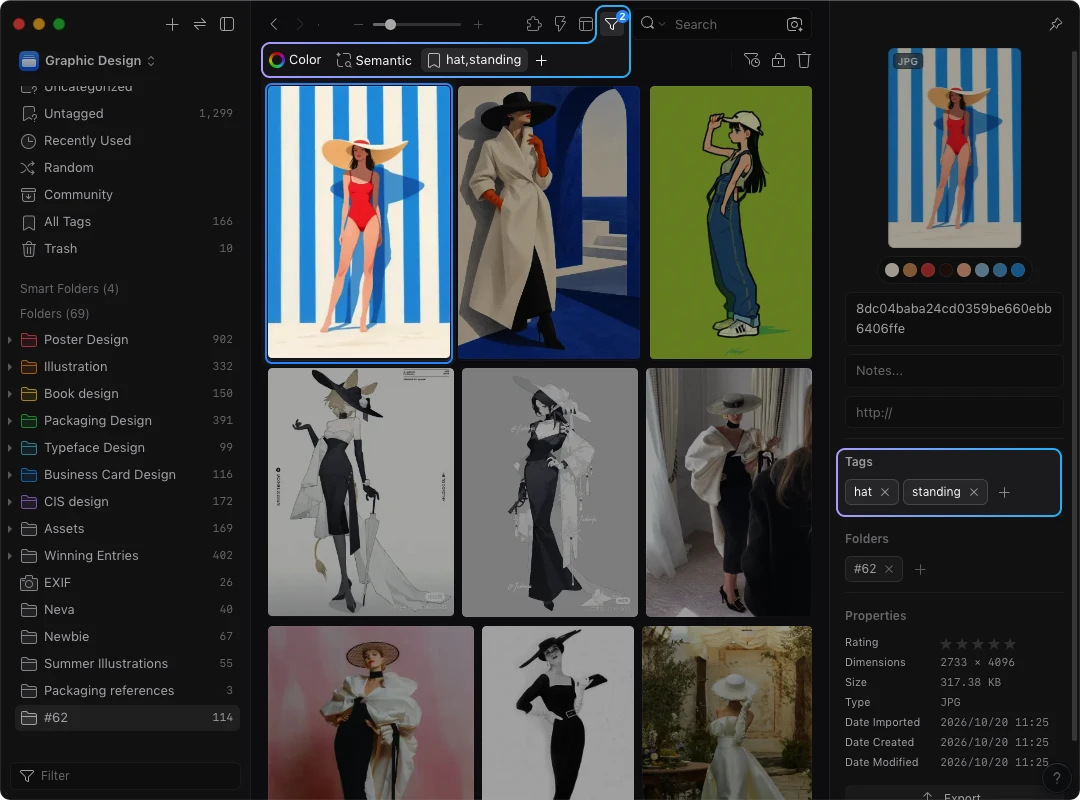
| Find a standing figure wearing a hat for pose study | A reference that shows the posture and body areas you need to study | The image itself; a close-up of a hat may match one clue while missing the pose |
Where possible, browse for a suitable item first and record a stable identifier or recognizable name. You can then check whether the search finds an item you know is there. If you cannot confirm that suitable material exists, record that uncertainty instead of calling the search a failure: your library may never have covered the need.
Run the agreed tests in Eagle using the search and filters you normally use. Note the library, current view or folder, and active conditions. If you need both the hat and standing tags, require both; a condition that accepts either will also return seated hat references and standing figures without hats. Eagle supports combining and excluding tags; the tag filtering guide explains those options.
If you already have the official AI Search plugin, you can also test natural language search. It matches existing text such as filenames, descriptions, and notes. A search for “standing figure wearing a hat” needs useful text in the asset's record to match; this mode does not directly inspect the picture. The plugin's visual similarity search uses a reference image instead. See the AI Search introduction for setup and the distinction between the two modes.
Record the obstacle before deciding its cause
Keep a record for each test:
Work need and suitability criteria:
Known suitable item, and how I confirmed it (or unknown):
Library, view/folder, and active conditions:
Query and search method:
Items I inspected; which met the criteria:
What made me stop, change the search, or browse elsewhere:
Observed clue or information gap:
Possible cause and the check still needed:
“The item appeared after I searched a broader view” is an observation. “Our folder structure is wrong” is a possible explanation that needs more checking.
Give the agent your records and ask it to distinguish between searching the wrong part of the library, using inconsistent words, setting overly restrictive conditions, missing information, and not knowing whether suitable material exists. Then choose the next check together. Changing one condition at a time can help reveal which condition excluded a known item.
Understand the information your searches depend on
Use the test records to decide what you need to preserve about each asset: what it shows, how you interpret it, how it relates to your work, and what you need to know before considering it for use.
Check four kinds of information
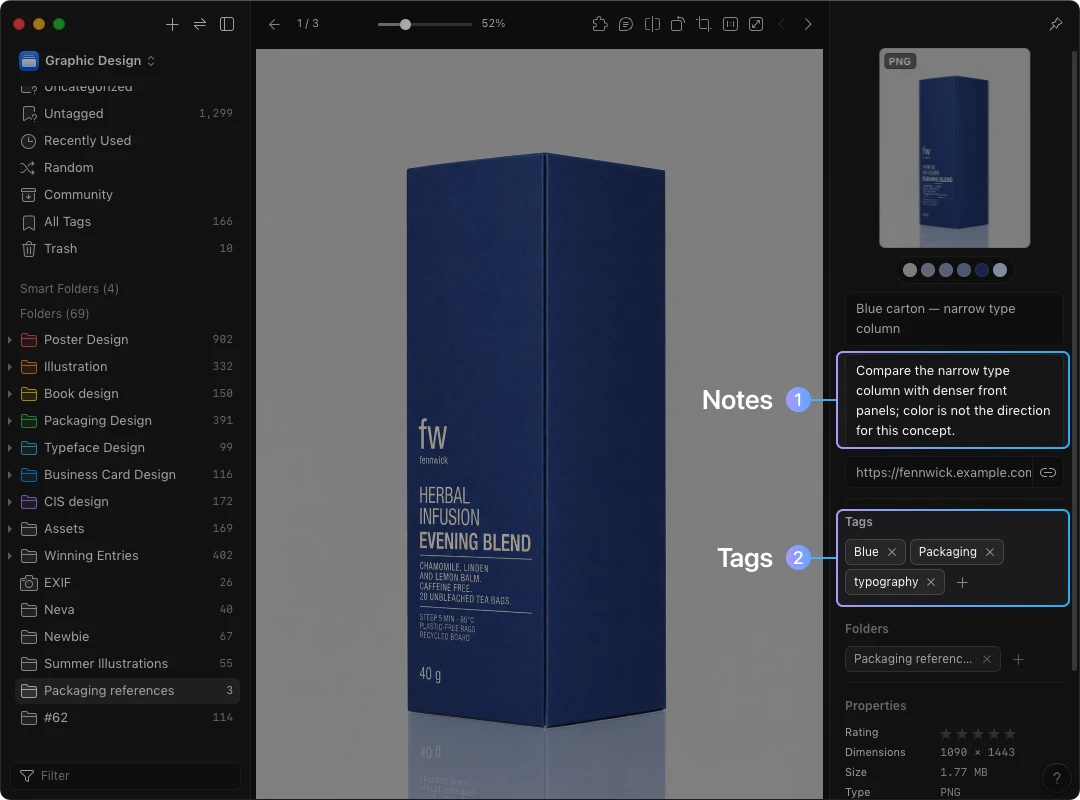
Suppose you kept a blue carton image to study the typography on its front panel. It has a narrow type column with plenty of space around it. The visible details and your reason for saving it serve different purposes:
| Information | What to record | What it helps you find or judge |
|---|---|---|
| Visible content | Blue carton; narrow type column; space around the text | Observable clues for recognizing and describing the image |
| Interpretation | “The space around the type column makes the text easier for me to follow; I want to compare this treatment with denser layouts.” | Why the reference may be relevant, with the judgment explained |
| Work relationship | “Selected as a typography reference for a previous concept,” if you have that knowledge | A reason to retrieve it from a particular project or task |
| Source and use conditions | Original source and any applicable usage information; unknown where evidence is missing | Where to check the original source and whether the material can be considered for the intended use |
This checklist keeps distinct kinds of information from being folded into one label. Getty's vocabulary guidelines offer a broader example of separating concepts and their relationships; this four-part checklist is not the Getty classification system.
Two carton references can share the same blue color while arranging their text very differently. A blue tag can describe the color, while a note explains the typography relationship. If the source is unknown, preserve that status and investigate it when needed. The agent cannot establish permission or an undocumented history of use from appearance.
Give folders, names, tags, and notes different jobs
Choose where to keep a clue by how you will use it:
| Place in Eagle | Useful role in this exercise | Packaging example |
|---|---|---|
| Folders | Gather material you want to browse or compare together | A packaging collection and a concept reference collection |
| Name | Identify the item without opening it | “Blue carton — narrow type column” |
| Tags | Keep short, repeatable clues you combine across collections | packaging, blue, typography |
| Description or note | Preserve the feature, reasoning, or relationship that needs a sentence | “Compare the narrow type column with denser front panels; color is not the direction for this concept.” |
| Source information | Keep the route back to the original material | Original URL and a record of the relevant use conditions |
Eagle allows one item to belong to multiple folders without making separate copies for classification. You can keep a useful project collection and add clues that help you search across projects, without putting every distinction into the folder tree. The graphic design assets and references guide explains the roles of these fields and the difference between project records and a long-term reference library.
For each proposed clue, check whether it helps answer one of your test needs, whether you can apply it consistently, and whether it is worth maintaining. For example, ask the agent to compare the definitions of simple and minimal and the images tagged with each. Use one preferred term if they serve the same purpose in your library; define the criteria if you need to distinguish them. A white-space tag describes a layout feature, while minimal describes a design style. Do not merge them just because they often occur on the same image.
An observable feature such as “wide space around the text” may be easier to apply consistently than an unexplained mood word. Keep a subjective term when it is useful, but give it a definition and test it against an example. If the example does not fit, explain why. Use those judgments to develop your rules.
Develop organization rules with your AI agent
Give the agent your work background, test records, and decisions about what to record. Ask it to propose rules for the obstacles you observed, with a reason and an exception for each recommendation.
Compare ways to solve the same problem
If you can already find the carton by browsing but its typography explanation is missing, a note may be enough. If equivalent tags spread suitable items across several terms, choosing a consistent term may help. If you repeatedly need to compare references together, changing how you group them may be useful. Each change solves a different problem and takes different effort to maintain.
Use this conversation template:
My work and typical asset needs:
[Paste the background answers.]
Search tests and observed obstacles:
[Paste the actual records, including uncertain causes.]
Current examples:
[Folder names, tags, and representative asset names/notes.]
Decisions about useful information:
[Clues, definitions, and facts still unknown.]
Keep:
[Useful collections, names, source records, and work context.]
Willing to change:
[The fields or organization decisions I am prepared to revise.]
Compare adding descriptions/notes, standardizing terms, and changing
collections where they address my recorded problems. For each proposed
rule, explain the need it supports, where it belongs in Eagle, the
judgment required, a positive example, a near miss, and an exception.
Ask me about missing facts. Then challenge the rules with my examples.
Do not assume that the whole library needs rebuilding.
Use a counterexample to refine the rule
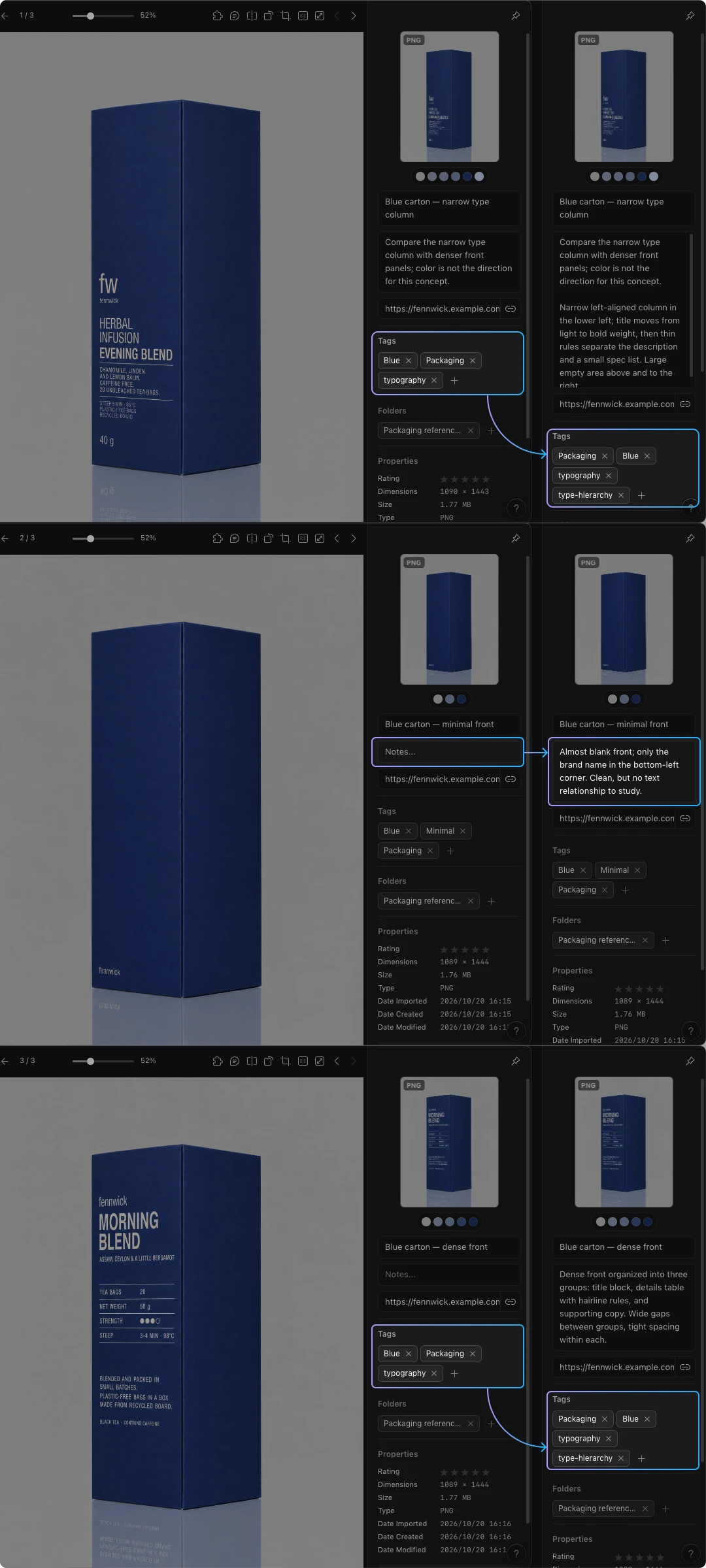
Suppose you want to study how packaging distinguishes titles, product details, and supporting copy. The agent instead proposes a rule based on how uncluttered the layout looks. You test it with two contrasting images:
Agent proposal: “Tag uncluttered packaging as simple-layout.”
Your counterexample: “One image has almost no text. It is uncluttered, but it does not give me enough to study how titles and product details are distinguished. Another has more text yet separates the title, product details, and supporting copy clearly. I want to compare how size, spacing, or grouping creates those distinctions.”
Refined rule: “Use type-hierarchy for packaging references that let you compare the size, spacing, or grouping of titles, product details, and supporting copy. Add a note describing the specific arrangement worth studying. Do not apply it merely because the package has few elements.”
The revised rule classifies references by their relevance to your typography research, rather than by how uncluttered they look. The almost blank package is a near miss for this test: it may look uncluttered without showing the information hierarchy you need to compare. You decide which differences in size, spacing, or grouping matter for your work; describing the layout only as uncluttered may miss them.
Put the agreed decisions in a rule table:
| Need | Place in Eagle | Rule and positive example | Near miss | Exception or check |
|---|---|---|---|---|
| Compare packaging type hierarchy | Tag plus note | Use type-hierarchy when the reference lets you compare the size, spacing, or grouping of titles, product details, and supporting copy; “a wide gap separates the title from the product details” |
An almost blank package with no useful hierarchy to study | Keep a tentative interpretation in the note until you can explain it |
| Recover a previously selected reference | Relevant folder plus note | Preserve the collection and record the known project relationship | Visually similar material with no recorded connection to that project | Ask the person who remembers the use; do not infer it from the image |
| Find footage candidates for a particular edit | Searchable scene/framing description plus source record | Record observed content and framing; check source terms for the intended project | A portrait clip with unknown use conditions | Mark the unresolved source information; keep the suitability decision open |
For your own rules, use the same columns and add the exact terms you will enter. Ask the agent which images could fit more than one rule, which distinctions duplicate each other, and which decisions require knowledge that an image cannot supply. A useful follow-up is: “Show me the case where this rule would put the wrong item in my results.”
Some agreed rules can later become Custom Instructions for the official AI Action plugin. Its image operations include naming, descriptions, tags, and assignment to existing folders. Decide on the folder structure yourself, since AI Folders works with folders that already exist. The AI Action introduction explains that distinction and links to its setup guides.
Try your rules on a small batch in Eagle
Choose a batch that tests where your rules apply and where they do not, then agree on exactly what should change. Include frequently used items, an item you previously missed, easily confused items, and an exception. Ask the agent to suggest candidates from the records you provided, and confirm that they represent the problem you are trying to solve.
Define the trial before applying changes
For the packaging rule, a useful trial includes a clear example of the type hierarchy you want to study, the uncluttered near miss, and a denser image whose text grouping may also be useful. Before editing, record:
- The exact selected items and why each belongs in the trial.
- The fields you will change and the expected text or classification.
- Existing information to retain, including source records and known project use.
- Ambiguous cases the agent should return for your decision.
- How you will compare the previous and revised records.
For example, the obvious reference should receive the agreed tag and a specific explanation. The uncluttered near miss should remain outside that tag. The denser image needs your judgment about whether its grouping offers the relationship you want to study. Keep the before values so you can inspect omissions as well as additions.
Choose the route available to you
Ordinary AI conversation, with manual changes. Give the agent the permitted images or descriptions and ask for an item-by-item edit list. It can propose names, notes, and tags from that material. Review the suggestions, then enter the agreed changes in Eagle. The conversation itself does not give the agent access to your library.
AI Action already installed and configured. Use the agreed rules to prepare instructions for the image operations you intend to run. For a description-only trial, a starting instruction could be:
Describe the visible text layout of this packaging image: the placement
of the main title and supporting text, their relative size, and spacing.
Name a specific relationship that can be inspected. Distinguish the
images using visible differences. Do not infer project history or usage
permission. If the image does not provide enough detail, say what is
unclear.
Use the operations and input formats supported by your configured Action. The official introduction describes image analysis, but does not confirm support for analyzing video clips. Use the manual route for material your configuration does not support.
Keep source and work records outside the fields being replaced. Check the before values rather than assuming an operation will append or merge them, and review whether each reference is useful for your work.
Agent already connected through Eagle Skill or Eagle MCP. First ask it to report the available library operations and confirm the items and fields it can access. Have it list the proposed changes to the selected batch, including information to retain, then approve that plan before execution.
Use the official connection introduction and its setup guides if you need to establish the connection. The available tools determine what it can do; a conversation about organization alone is not evidence that it can read or edit Eagle.
Eagle's AI organization guidance recommends checking a small batch before scaling. At this stage, check whether the edits follow your rules. The next section checks whether those rules help you find material.
Inspect the results and report a specific error
Compare each changed item with its previous record and the agreed rule:
| Check | What to look for |
|---|---|
| Where the rule applies | The positive case is included; the near miss is excluded for the stated reason |
| Description differences | Each description identifies something useful about that item, rather than repeating “clean, modern packaging” |
| Vocabulary | The agreed term is used consistently, without an unrequested equivalent |
| Retained context | Source information, prior observations, and known work relationships survive |
| Uncertainty | Missing information stays unresolved instead of becoming an invented fact |
When something is wrong, send the agent an error record:
Item:
Rule and intended field:
Before value:
Expected change and its reason:
Actual change:
Why it does not fit:
What I can confirm; what is still unknown:
If you have chosen references for their type hierarchy but the instructions still say to tag any uncluttered package as simple-layout, correct both the classification criteria and the tag in the instructions. If the agreed tag is applied correctly but groups references with nothing useful in common, revisit the rule. If one small image is too unclear to assess, record what you cannot tell about that item. Ask the agent which explanation fits the record and what you should check next. Avoid changing every rule in response to one unclear item.
Retest your searches and decide what to change next
Run the original searches again before expanding the changes. Keep the suitability criteria and searched items or views comparable, and begin with the same search method. Then try a related new need and check what it takes to add new material under the rules.
Compare what you can actually observe
Use your first test record as the baseline. Search the trial items, then search your usual broader view to see how the rest of the library affects the results. Finding an item in the edited batch does not show that the whole library covers your needs.
| Test and fixed suitability criteria | Recorded scope and known suitable item | Original method, result, and obstacle | Same-method result after editing | Changed-method result, if any | Remaining obstacle |
|---|---|---|---|---|---|
| [Original work need; what qualifies] | [Items/view; known item or unknown] | [Query, conditions, inspected candidates, obstacle] | [Actual query/conditions and observations] | [Describe the change separately] | [What remains hard or uncertain] |
For the carton, check whether your usual search now brings you to the known image and whether the note explains why you selected it. If you also switch to AI Search, record that as a separate comparison: changes to the records and changes to the search method may both contribute. Do not attribute the result entirely to the new tag.
Inspect unsuitable results as well as successful ones. Did you still have to try several terms? Did a rule exclude a useful item? Could you judge relevance from the recorded explanation, or did you need to reconstruct the original thinking?
Add a related need that you did not use to design the rule. For example, try finding a typography reference for a denser back panel, rather than the familiar front panel. Then add a new reference and see whether you can apply the rule without a long debate. This tests whether the rule works for a different need and how much effort it takes to maintain.
Choose the next change from the result
- Useful results, manageable upkeep: Keep the working rules and gradually try them on more relevant material.
- Edits follow the rules, but searches remain difficult: Revisit the missing clues, terms, or decisions about what belongs in each category with the agent. Another field may need the work context you are searching for.
- Edits do not follow the rules: Return to the trial instructions and execution checks before judging the organization method.
- Results help, but entering information is too demanding: Remove distinctions you do not use, merge overlapping rules, or narrow the material you process.
Keep the current rule table and update it when you change a definition. When you review the rules, ask which ones you use, which need repeated correction, what information is regularly missing, and whether your work has changed. A quarterly check is one option; a new client, a new asset format, or repeated search failures may be a better trigger for your workflow.
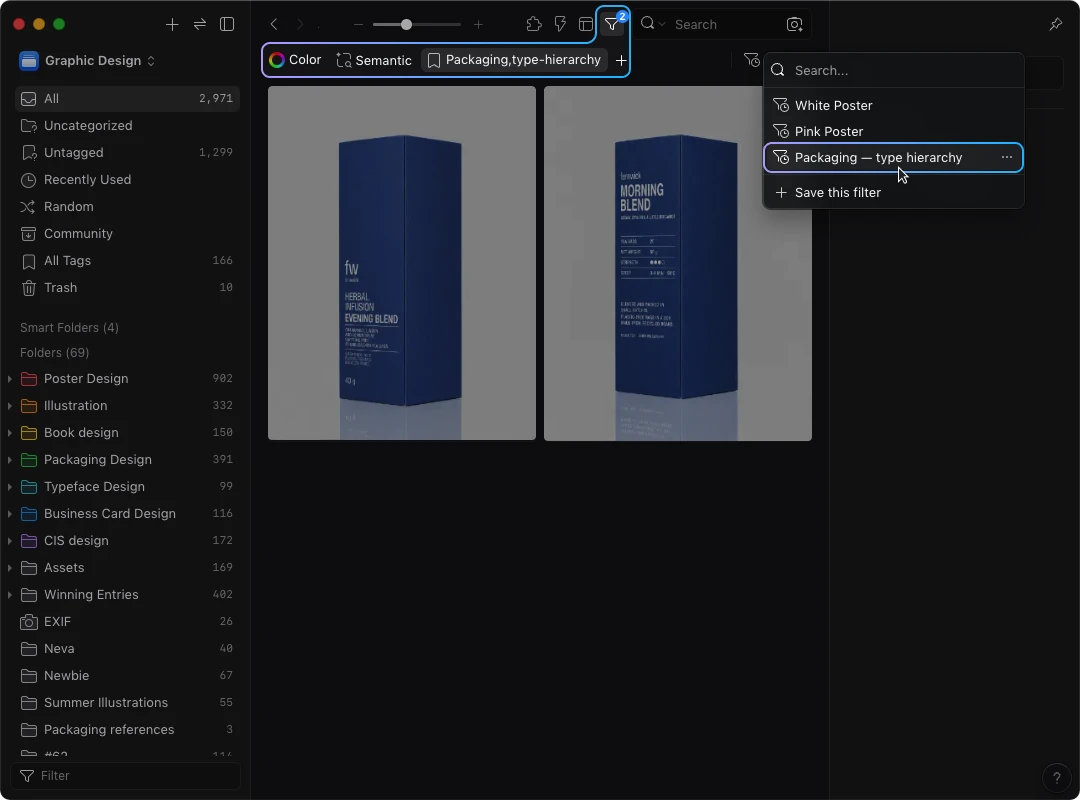
Once a filter combination proves useful, save it for everyday reuse. Eagle's Saved Filter feature stores search conditions so you can apply them again. It does not freeze the matching items or prove the library contains everything you need. Keep your test records separately from that reusable search.
Start the next conversation with one recorded search obstacle. Use it to agree on a rule, inspect a small trial, and decide from your results whether that rule deserves a place in your everyday workflow.
Artículos relacionados